





















Cloud-Based Business Process Automation Software With Security Engineered In
Cloud-based business process automation software runs the daily work of most B2B companies. It moves leads to sales, deals to billing, and orders to operations. Most teams adopt it quickly. However, far fewer stop to ask what happens to their data on the way.
Every new connection between two systems opens another door. Some of those doors have locks, and some were left open by accident. So the more you automate, the more doors you have to watch.
At Fruition RevOps, we start with security and build the automation on top of it. Let’s take a walk through how that works. Along the way, we’ll cover the risks most companies miss and the steps that keep every data flow governed.
What Is Cloud-Based Business Process Automation Software?
Cloud-based business process automation software lets a company design, run, and manage repeatable workflows on internet-hosted platforms. The work runs without on-premise servers or people copying data by hand. It does the copy-and-paste work between your systems so your team doesn’t have to.
Picture a sales rep who closes a deal in the customer relationship management (CRM) system. Without automation, someone retypes that deal into a finance spreadsheet. With it, the record moves on its own, the same way every time. Likewise, an ops manager no longer chases approvals over email. Instead, a workflow alerts the right person the moment a condition is met.
The cloud part simply means the software runs on the internet instead of on a server in your office. Because of that, it scales as you grow. In addition, your team can reach it from anywhere. It also connects to your other cloud tools without custom servers in the office.
Typical uses include lead handoffs from marketing to sales and billing triggers when deals close. Teams also automate CRM updates, cross-department alerts, reporting pipelines, and onboarding steps. When it runs well, RevOps works like a coordinated machine. However, the same machine turns into a liability when the foundation is weak. Without data centralization, untracked data flow creates gaps nobody sees.
Why Security Comes First in Cloud Automation
Most automation platforms lead with speed, ease of use, and the number of apps they connect. Security usually shows up much later in the pitch, if at all.
Other vendors offer an on-premise agent with a different job. The agent gives a cloud service a secure path to your systems without opening inbound ports. The integration itself still runs in the vendor’s cloud.
Meanwhile, a typical stack links the CRM to the enterprise resource planning (ERP) system. It also connects the finance system and a logistics platform. Each link sends data across vendor environments and sometimes across countries. As a result, every integration point becomes a possible exposure. For example, one misconfigured webhook can leak records. Similarly, an application programming interface (API) key with too many permissions can leak data. The same is true of a transfer that skips encryption.
$4.44M
is the global average cost of a data breach in the IBM breach report for 2025.
The National Institute of Standards and Technology (NIST) Cybersecurity Framework 2.0 lists six functions for managing cyber risk. They are Govern, Identify, Protect, Detect, Respond, and Recover. NIST added Govern in 2024 to put ownership and policy at the center. Yet most off-the-shelf automation tools cover only one or two of these functions. As a result, the rest falls to your team.
That gap between the tool and your own security needs is where incidents start. To close it, choose cloud-based business process automation software with security built into every layer.
Four Things Secure Cloud Automation Requires
Plenty of vendors claim strong security. In a cloud automation stack, four requirements back that claim up.
Picture moving valuables from one house to another. You decide who holds the keys and lock the truck while it drives. You also keep a list of every box and check that the moving company can be trusted. Secure automation works the same way.
Access Control
Role-based permissions decide who can trigger, view, or change each automated workflow. After all, not every person in your company needs access to every data flow. Tight roles also limit the damage if someone ever steals a login. In moving terms, this is deciding who holds the house keys.
Encrypted Data Transit
Data moving between systems should travel over encrypted channels, using Transport Layer Security (TLS) 1.2 or higher. Your systems should also mask or tokenize sensitive fields when they store them. That way, nothing passes between platforms as plain text. This is the locked truck on the road between houses.
Audit Logging and Traceability
Your stack should log every trigger, data write, and system call with a timestamp and a traceable ID. The log works like a packing list that records every box, who moved it, and when. If something breaks, you can see what happened, when it happened, and which record it touched.
Vendor Security Posture
Your automation is only as secure as the weakest platform in your stack. So every vendor needs to meet a baseline too. You wouldn’t hand your keys to a moving company you hadn’t checked, and the same goes for software vendors. The HubSpot Trust Center is a good example of a vendor publishing its security practices openly.
These four requirements matter most for companies that handle customer financial data or health information. They also matter for companies working across regions with data residency rules. In each case, build them into your data architecture from day one. Fixing them after an audit finds a gap costs far more.
Where Cloud Automation Setups Break Most Often
Most security gaps in cloud automation start as small shortcuts that pile up as teams build quickly. Four of them show up again and again.
Shared API Keys
One key often powers several workflows because it was quick to set up. That is like one key that opens every door in the building. When that key leaks, every connected system is exposed at once. Give each integration its own key with only the permissions it needs, and rotate keys on a set schedule.
Webhooks Without Verification
A webhook is a web address that receives data from another system. Think of it as a mail slot in your front door. However, some webhooks accept any request without checking the sender. Anyone who finds the address can then push fake records into your stack. Signed requests close this gap, and most major platforms support them.
Admin Logins Used to Connect Tools
Teams often connect tools with a person’s admin login, so the workflows quietly depend on one employee’s keys. When that person leaves, the workflows either break or keep running under an account nobody watches. Dedicated service accounts with limited roles avoid both problems.
Test Runs That Reach Live Data
For example, sandbox and live environments sometimes share connections. In that case, a test run can write fake orders or send real customers an email. Keep separate credentials for each environment, so a test can never touch live data.
Each of these gaps costs little to close early. Finding one after an incident costs far more.
How Fruition RevOps Builds Cloud Automation Around Security
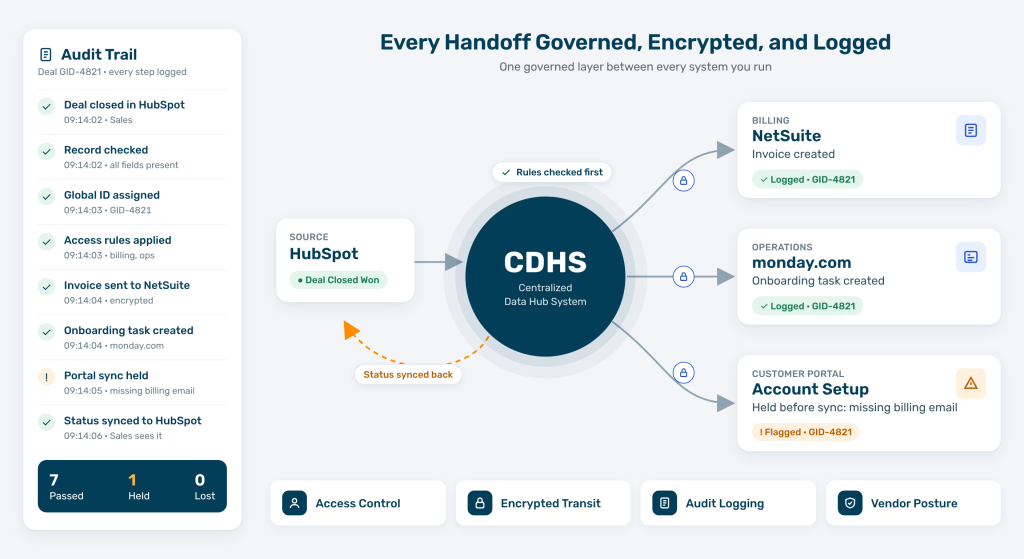
Our approach starts with the Centralized Data Hub System (CDHS). CDHS is a managed data layer that sits underneath your tech stack. It governs how information moves between every platform you run.
Picture a security checkpoint that every piece of data passes through. Instead of each system talking directly to every other system, everything goes through CDHS first.
Every record gets a global ID. Every system connection is governed. Every data flow is logged.
When a deal closes in HubSpot, CDHS first checks that the record is complete. Next, it assigns a global transaction ID and logs the handoff with a timestamp. Only then does it trigger the downstream steps your access rules allow. If a field is missing or malformed, CDHS catches it before the error spreads to other systems.
That is the gap between automation that moves data and automation that governs it. With CDHS, your sales, finance, operations, and logistics platforms connect through one controlled layer. Without it, they connect through a tangle of direct integrations that nobody fully understands.
From a security view, one checkpoint also gives you one complete audit trail. Your team no longer chases logs across five platforms, because every event traces back to a single place.
Our Let Data Flow framework shapes every engagement. It maps the systems first, then the rules, then the automation. The integration layer needs the same care. After all, each integration platform as a service (iPaaS) handles secure data transfer a little differently.
Who This Approach Fits
This approach fits scaling B2B companies whose operations have outgrown spreadsheets and manual handoffs. Often, these teams automate quickly but haven’t yet added the governance layer that keeps automation secure and consistent. Three signs usually show up first.
Data Silos Between Departments
Sales works in HubSpot, while finance runs on NetSuite or Xero. Operations lives in monday.com or ClickUp. As a result, no two teams see the same version of customer or order data. Decisions then rest on partial pictures.
Manual Handoffs That Create Compliance Risk
When people copy data between systems, errors creep in. If those errors touch financial records or customer data, the risk goes beyond operations. In fact, a single misrouted record can trigger a compliance event.
Automation That Grew Faster Than Its Governance
Over time, workflows pile up across HubSpot, Zapier, and custom scripts. Eventually, nobody can say what connects to what, and that becomes a security problem waiting to surface. A consistent process is the base everything else depends on.
If any of these sound familiar, the usual first step is a structured review of your systems. Mapping your systems shows where they connect and where governance has gaps. From there, a RevOps consultant can help you decide what to fix first.
How to Spot Gaps in Your Cloud-Based Business Process Automation Software
You can start checking your own setup before you talk to anyone. Three questions cover most of the ground.
Who Can Change Each Workflow?
List every automated workflow and the people who can edit it. Then check the flows that touch billing or customer data. If anyone with a login can change them, your access rules are too loose. Former employees and shared admin accounts are common gaps.
Can You Trace One Record From Start to Finish?
To start, pick a recent closed deal and follow it through every system it touched. Note where the record changed and what changed it. If the trail goes cold in any system, that system needs logging.
Which Connections Does Nobody Own?
Many stacks carry old Zapier zaps, webhooks, and scripts that nobody remembers building. Each one still moves data every day. Give every connection a named owner, and switch off the ones nobody claims.
Secure Automation Starts Before the First Workflow
Cloud-based business process automation software doesn’t come secure by default. In fact, most platforms are built for speed and easy setup. They leave the security settings to you. So the automation works until the day it breaks. When that day comes, the fallout hits both operations and reputation.
Fruition RevOps builds it with governance from the start. CDHS creates one governed layer that logs every data flow and controls every connection. Your team can trace every automation back to its source.
Some teams are still comparing cloud automation options. Others already run automation that has outgrown what they can account for. Either way, the work starts with knowing what you have, how it connects, and where the gaps sit.
Frequently Asked Questions
What Is Cloud-Based Business Process Automation Software?
It is software that runs repeatable business workflows on internet-hosted platforms. It moves data and triggers tasks between systems such as your CRM, ERP, and finance tools. As a result, people don’t have to copy records by hand.
Is Cloud-Based Business Process Automation Software Secure?
It can be, but security depends on how it is set up. Look for role-based access, encrypted data transit, audit logs on every action, and vendors that publish their security practices.
What Does the NIST Cybersecurity Framework Cover?
NIST CSF 2.0 organizes cyber risk into six functions. They are Govern, Identify, Protect, Detect, Respond, and Recover. Govern, added in 2024, covers ownership, policy, and oversight.
How Much Does a Data Breach Cost?
IBM’s 2025 Cost of a Data Breach report puts the global average at $4.44 million. That said, costs vary widely by industry and region.
How Does CDHS Keep Automated Data Flows Secure?
CDHS sits between your existing systems and acts as one governed layer. First, each record gets a global ID. Next, CDHS logs each handoff with a timestamp. Finally, access rules decide which downstream steps can run.
See Where Your Data Moves Without a Lock
Every connection in your stack either has an owner or it doesn’t. Talk with us about where your data moves today and which handoffs still lack governance. There is no obligation attached.