



















Blueprint your revenue system like an architect blueprints a house.
See every platform, process, and handoff mapped visually.

The Systems Automation Engagements (SAE) Map reveals how your business actually operates. Most companies can’t answer: “Where does data break between Marketing and Sales?” or “Why do Operations build the wrong thing?” SAE shows you the answer — every system, every workflow, every gap highlighted in one visual map.

System Automation Engagements (SAE)

Visualize how your systems truly connect, revealing where data flows, stalls, or gets lost between teams.

Stop losing deals in the handoff between Sales, Ops, and CS. QDF moves data and triggers actions between systems instantly.

Your sales team closes a deal. Finance doesn’t see it for 3 days. Operations builds the wrong thing. Customer Success never gets the handoff. Quick Data Flow (QDF) fixes this — data flows between systems in real-time, without custom code that breaks when platforms update.

Workflow Automation

Turn every manual process into motion — connect systems, trigger actions, and let automation carry your revenue forward.

When every system tells a different story, nobody can make confident decisions. CDHS unifies CRM, ERP, Finance, and Ops into one real-time data layer and Single Source of Truth.

Your CRM says one thing. ERP says another. Finance is running reports from spreadsheets. Nobody trusts the data. The Centralized Data Hub System (CDHS) is your Single Source of Truth (SSOT) — real-time sync across every platform, governed data, and one unified view that actually works.

CDHS: How it Works?

Bring your data together in one place. It’s built to sync in real-time, link, and deliver insights you can use tomorrow.

Pre-built campaign automation kits, deploy customer engagement workflows without custom development.

Automation Campaigns Creator (ACC) provides pre-built engagement workflow kits designed to address specific areas of revenue leakage. Each ACC KIT includes campaign architecture, automation sequences, and multi-channel touchpoints — ready to deploy without custom development.

Automation Campaigns Creator (ACC)

Transform your Customer Engagement Journey with ACCs’ KITs intuitive automation tools.

Capture Decisions, Assign Tasks, and Keep Work Moving Without Manual Follow-Ups

Teams leave meetings with good intentions, but follow-through breaks down. Notes scatter across Slack. Action items disappear into documents. TALK-to-TASKS closes the execution gap — turn meeting recordings into correctly routed tasks automatically.

How TALK-to-TASKS Works?

Routing conversations from meetings with two clicks into the right place to the right person on your Project Tool.

Connecting systems is a solved problem. Governing the decisions inside them is not. The Decision Routing Cockpit is where the rules that run your revenue business finally live in one governed layer.

Right now those rules live in four places at once. A workflow no one owns, a spreadsheet no one updates, a script only one contractor reads, and the head of the person who remembers. The Decision Routing Cockpit (DRC) pulls all of them into one governed layer, with global defaults, per-case overrides, and every change audited six ways.

How Does It Work?

Every rule your revenue business runs on becomes named, scoped, and auditable. By the business, without a developer touching code.

Data Flow Architecture Design

Built from your SAE Map, we design workflows that connect systems and trigger the right actions at the right time.

Integration Path Selection

We choose the optimal path—native connectors, APIs, iPaaS (Make, Workato), or N8N—for reliable, scalable data flow.

Team Training & Documentation

We onboard your team, document workflows, and ensure everyone knows how the system works.

We design and build QDFs that move data and trigger actions across your systems in real-time.

You need workflows that don’t break when platforms update. We implement Quick Data Flows using your SAE Map as the blueprint—connecting CRM, ERP, operations, and finance so every action flows automatically without custom code that breaks on the next update.

CDHS Architecture Design

Built from your SAE Map, we design the central hub that connects all systems and establishes your single source of truth.

Master Data Management (MDM)

We establish control and accuracy across every record, ensuring clean, consistent, reliable data everywhere.

Data Governance & Flow Rules

We define ownership, validation rules, and automated flow logic to keep your data clean as it scales.

We implement CDHS so every system, report, and decision runs from one source of truth.

When CRM, ERP, Finance, and Operations all tell different stories, nobody can make confident decisions. We build your Centralized Data Hub System using your SAE Map to define data ownership, flow rules, and governance—so you finally have one real-time view that everyone trusts.

Campaign Strategy & Journey Mapping

We map your customer journey, identify engagement gaps, and design campaigns that address specific revenue leakage points.

Multi-Channel Workflow Design

We design coordinated workflows across email, SMS, in-app messaging, and sales triggers for unified engagement.

Campaign Launch & Optimization

We build, test, launch, and continuously optimize your campaigns for maximum conversion and engagement.

We design and deploy multi-channel engagement campaigns using ACC templates—customized for your customer journey.

Generic email sequences don’t work. We build Automation Campaign Creator (ACC) workflows tailored to your specific revenue leakage points—combining email, SMS, in-app, and sales triggers across HubSpot, Klaviyo, and your CRM to drive engagement that converts.

Integration Architecture & Path Design

Selecting the optimal path for seamless, scalable data flow across Departments.

Custom Implementation & Config

From simple plug-ins to advanced cross-system builds, we tailor each setup to your business logic.

Mastering Seamless Migration & Implementation Systems

Your new tools integrate smoothly, align with your workflows, and start delivering value from day one.

We don't just connect systems, we make them work in harmony. Fruition designs, builds, and implements integrations that keep your operations flowing without friction.

Most integrations are duct-taped APIs that break when platforms update. We design integration architecture for the long term—selecting the optimal path through native connectors, APIs, N8N, or iPaaS like Make or Workato.

15-minute conversation that reveals where your revenue system breaks — gaps, silos, missed handoffs mapped visually.

Most companies can’t answer basic questions: “Where does our sales data break?” “Why doesn’t Operations know what Marketing promised?” The SAE Diagnostic reveals your answer in 15 minutes — a visual map showing exactly where systems disconnect, data gets lost, and revenue leaks.

System Automation Engagements (SAE)

Visualize your business blueprint. See every system, process, and touchpoint in one place.

Stop Revenue Leakage

Find and fix the invisible cracks draining your time, money, and margins — before they turn into growth barriers.

Preventing your Data Silos — Get your SSOT

Centralize scattered data and replace confusion with clarity, ensuring every department works from one truth of data and build your single source of truth (SSOT).

Process Mapping & Documentation

We map how work truly gets done across RevOps, Production, and Operations — turning chaos into structured processes.

SOP Design for Automation Readiness

Every SOP is built with automation in mind, ensuring systems and people work together. Not against each other.

Adoption & Change Enablement

We don't just document; we drive adoption. Teams learn how to follow, improve, and trust the process, turning SOPs into muscle memory.

Transform tribal knowledge into repeatable workflows, giving your teams the structure to scale with clarity and consistency.

Automation breaks and centralization stalls when teams work from memory instead of process. We map how work truly gets done — turning SOPs into muscle memory, not shelfware.

Team Training & Enablement

Hands-on training sessions tailored to your team's roles, ensuring everyone uses new systems confidently from day one.

Adoption Measurement & Optimization

Track adoption metrics, identify blockers, and continuously optimize workflows to ensure your team actually uses what you built.

Gold Partner Implementation Support

We're Gold Partners with HubSpot, Monday.com, and Segment — meaning we bring certified expertise to every implementation.

We don't just hand over systems — we onboard your team, train them to use tools confidently, and ensure adoption sticks.

New systems fail when teams don’t adopt them. We train, enable, and support your team through the transition. As Gold Partners with HubSpot, Monday.com, and Segment, we know how to make systems work for your people.

RevOps Strategy & System Architecture

We align your go-to-market strategy with your tech stack, designing the operational backbone that connects Marketing, Sales, and CS.

Performance & Optimization with Automation Support by AI agent

Our consultants analyze your funnel, uncover hidden inefficiencies, and rebuild your operations for precision, speed, and scalability.

Tech Stack Alignment & Implementation

From HubSpot and NetSuite to Monday.com and Shipwell, we integrate and orchestrate your tech ecosystem into one coordinated revenue engine.

Strategic advisory for revenue operations — system architecture, automation strategy, data governance, and team enablement.

RevOps isn’t just about connecting systems — it’s about aligning strategy, data, and execution. Our consultants bring two decades of experience building revenue engines for $50M-$500M companies.

The LET DATA FLOW™ Framework

Fruition RevOps’ proven framework turns disconnected systems into synchronized revenue engines. Each stage reveals where your data, workflows, and teams fall out of sync, and rebuilds them into one intelligent flow that drives efficiency, visibility, and growth.
Four stages that guarantee smooth process alignment

1

Diagram Your SAE Map

Map how your business actually operates across teams, capturing the customer journey, decision points, system roles, data handoffs, and revenue flow. This blueprint surfaces inefficiencies and defines what must be automated versus redesigned.

2

Map Your Data & Automation Attributes

Translate the SAE blueprint into a concrete data flow and automation model — defining system ownership, data attributes, relationships, and trigger logic. This prepares your foundation before building QDFs.

3

Centralize the Flow (CDHS)

Implement the Centralized Data Hub System as the governance layer connecting all systems and QDFs. CDHS enforces data ownership, flow rules, and establishes a single source of truth — ensuring automation stays stable as you scale.

4

Build & Execute Data Flow (QDF)

Deploy targeted Quick Data Flows that move data and trigger actions across systems in real time. Each QDF handles a specific business event — deal progression, order creation, production updates, billing changes — without manual intervention.

Manufacturing

Sync production schedules, inventory, and order fulfillment across ERP, CRM, and operations.

Healthcare

Connect patient data, billing, and care coordination across EMR, RCM, and operations systems.

Technology

Align product, engineering, sales, and customer success with real-time data across tools.

Consumer Services

Unify ticketing, CRM, and knowledge bases to deliver seamless customer experiences at scale.

Retail

Connect POS, inventory, e-commerce, and fulfillment for real-time visibility across channels.

Franchisors

Centralize franchise operations, royalty tracking, and performance reporting across locations.

Agencies

Sync project management, client billing, and team capacity across tools for better margins.

Investments

Unify portfolio tracking, deal flow, and LP reporting for complete investment oversight.

Meet Our Team

The automation architects, data specialists, and RevOps consultants behind Fruition.

Our History

Two decades transforming disconnected systems into unified revenue engines.

Partner With Fruition

Join our network of agencies and consultants implementing Fruition frameworks.

Our Philosophy

Where technology meets process—aligning Platforms, People, Processes, and Insights.

Resources & Learning

Latest Blog Posts

Stay current with RevOps insights and automation strategies

VideoTube Channel

Watch automation tutorials and implementation guides

Free RevOps Evaluation

Assess your revenue operations maturity

ACC Templates

Pre-built automation campaign kits ready to deploy

Framework Guide

Learn the Let Data Flow methodology step-by-step

Contact Our Team

Talk to automation architects about your systems

Case Studies

Real implementations with measurable results

Tools & Calculators

Revenue Leakage Calculator and diagnostic tools

Start Here Page

Not sure where to begin? We’ll guide you.

Why Data Flow

Most RevOps fixes treat the symptom. This is how we fix the operating model underneath.

Data Leakage Calculator

Find out how much revenue your business is losing and exactly where it’s slipping through the cracks.

Pricing

Every engagement follows a logical journey. Here’s where it starts.

SAE Architecture Map

Find where your revenue is breaking — every engagement starts here. We map your systems, identify leakage points, and show you exactly what to fix first.

Where Can I Find ERP Implementation Experts for Financial Services Firms?

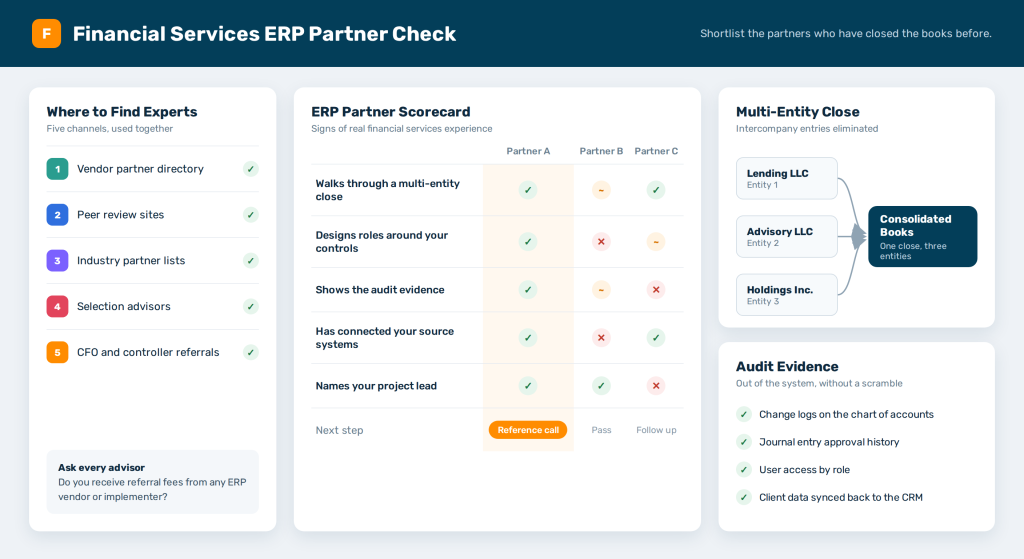
ERP implementation experts for financial services firms are easiest to find through five channels. Vendor partner directories, peer review sites, industry partner lists, selection advisors, and referrals from other finance leaders all produce qualified names.
Finding names is the easy part. Every partner on those lists will say they know financial services. The harder job is telling who has closed the books for a lender or a wealth manager. Some partners have only read about it.
Financial services puts demands on an enterprise resource planning (ERP) project that most industries never face. Multi-entity consolidation with intercompany eliminations is routine. Segregation of duties and audit trails have to satisfy auditors. Client and transaction data often starts in a core banking, portfolio, or customer relationship management (CRM) system. The ERP depends on data it doesn’t own.
What Financial Services Firms Need From ERP Implementation Experts

Financial services covers very different businesses, and each one leans on its ERP in a different way. The right partner for a lender may be the wrong one for an asset manager. Knowing which work matters most to your firm makes every partner conversation sharper.

Lenders

Loan-level detail usually lives in a loan servicing system, and the ERP receives summarized entries. The implementation work that matters most is the mapping between the two. Interest income, fees, and loan losses have to land in the right accounts every period. The partner should know how that feed gets reconciled.

Wealth and Asset Managers

Fee billing is often the hardest part. Fees tied to assets under management, tiered schedules, and household-level discounts have to flow from the portfolio system into invoices and revenue. Firms that run several funds or advisory entities also need clean consolidation across all of them.

Fintechs

Fintechs tend to process high transaction volumes through payment or banking partners, then post summaries to the ERP. They also add legal entities quickly as they enter new markets. A partner who has only implemented ERPs for stable, single-entity companies will struggle with that pace.
Whatever your segment, write down the two or three pieces of work that worry you most. They become the test you put to every partner on your shortlist.

Five Places to Find ERP Implementation Experts

Each channel below turns up a different kind of partner. Most firms get the best shortlist by using two or three of them together.

The ERP Vendor's Partner Directory

Every major ERP vendor keeps a list of certified partners, and it is the fastest place to start. NetSuite runs a partner finder covering several partner types, from solution providers and alliance partners to accounting firms and advisory firms. Sage points buyers to a Sage Intacct partner locator and runs a separate managed services program for accounting firms.
Microsoft grades its partners. Its Solutions Partner for Business Applications designation requires a capability score of at least 70 out of 100. The score is built from new customers, certified staff, and successful deployments.
A directory listing proves certification. It says nothing about financial services depth. Use the industry filter to narrow the list, then verify the claims yourself.

Peer Review Sites

Gartner Peer Insights tracks a market called Finance ERP Implementation Partners, with verified reviews of firms such as Accenture, Deloitte, KPMG, and PwC. You can filter reviews by industry and company size, which helps you see how a firm performed for organizations like yours.
These firms tend to fit large banks, insurers, and asset managers with complex global operations. A mid-market lender or advisory firm may find them more than it needs.

Industry-Focused Partner Lists

Some publishers rank partners by industry. The ERP Software Blog publishes Best Dynamics Partners for professional and financial services, an editorial list of eight Microsoft partners refreshed every six months. Its editors weigh industry expertise, case studies with measured outcomes, and the share of each partner’s business that comes from these sectors. The list states that placement is not paid.
A list like this gives a Dynamics buyer a short, pre-vetted starting point. Treat it as a shortlist and do your own checking.

Independent Selection Advisors

Selection advisors help you choose the ERP and the implementer before anyone configures anything. They earn their fee by knowing which partners have done work like yours.
Ask every advisor one direct question before you hire them. Do they receive referral fees from any ERP vendor or implementer? NetSuite, for one, runs a partner program for advisory and selection firms. A paid relationship doesn’t rule an advisor out, but you should know about it.

Other CFOs and Controllers

The most honest reviews come from finance leaders at firms like yours. Ask peers who recently replaced their ERP which partner they used, and what the first quarter-end close looked like afterward. Industry associations and CFO networks make those conversations easier to start.
A referral tells you how a partner behaves when something breaks. A directory never will.

Four Signs ERP Implementation Experts Have Done Financial Services Work

Claims are cheap in a sales cycle. Evidence is harder to fake. Ask each finalist to show you the four things below, with client names redacted if needed.

They Can Walk You Through a Multi-Entity Close

Ask them to describe a consolidation they set up for a firm with several legal entities. Listen for specifics about intercompany eliminations, currency translation, and who owned each step at month-end. A partner with real experience will talk about what went wrong the first time. A partner without it will talk about features.

They Design Roles Around Your Controls

Segregation of duties is where many ERP projects create audit problems without meaning to. Ask how they decide who can create a vendor, who can approve a payment, and who can post a journal entry. Strong partners map system roles to the controls your auditors test.
If your firm is public, or plans to be, this matters even more. Section 404 of the Sarbanes-Oxley Act (SOX) requires management to assess internal control over financial reporting in each annual report.

They Can Show the Audit Evidence the System Produces

Ask what an auditor will see. Change logs, journal entry approvals, and user access reports should all come out of the system without a scramble. Ask the partner for a redacted sample from a past project.

They Have Connected the Systems Where Your Data Starts

The ERP rarely holds client data first. A loan servicing system, a portfolio platform, or a CRM usually does. Ask which upstream systems the partner has integrated, and who owned the data mapping on those projects. If the answer is “the client,” expect to own it too.
These four signs separate ERP implementation experts from generalists who have added financial services to their website. A partner who can show all four is worth a reference call.
Watch for a few warning signs as well. A proposal that never mentions your auditors is one. Another is a project plan that treats data migration as a single line item. A third is a partner who can’t name the person who would lead your project. Each one suggests the financial services work will be learned on your time and budget.

The Work That Starts After Go-Live

Even the best ERP implementation experts scope their work around one system. The ERP gets configured, tested, and handed over. The places where it meets the rest of your stack are often left for later.
Picture a new advisory client. The relationship manager closes the deal in the CRM. Before finance can bill, compliance has to clear the account. The fee schedule has to match the signed agreement, and someone has to pick the right billing entity. The CRM partner configured the CRM. The ERP partner configured the ERP. Nobody owns the rule that connects them.
So people carry it by hand. Operations re-keys the client into the ERP. Compliance approves by email. Finance checks the fee schedule against a PDF. Each step works, and the whole thing depends on someone remembering to do it.

The ERP project ends at go-live. The handoffs between systems keep running every day after it.

The Centralized Data Hub System (CDHS) from Fruition works on those handoffs. CDHS sits between the systems you already run and acts as a translator. The CRM, the ERP, and your finance tools then follow the same rules.
You set each rule once. A client account reaches the ERP only after compliance approves it. The fee schedule comes straight from the signed agreement record. Approvals that need a person route to the right owner through the Decision Routing Cockpit, with the context attached.
CDHS works alongside whichever ERP and implementer you choose. The same approach helped a water infrastructure company running HubSpot and Zoho cut internal emails by 60%. It also eliminated duplicate entries between the two systems.
Many companies start smaller, with one Quick Data Flow (QDF) that fixes a single handoff, then expand as more rules come into view. If you are weighing who should own that work, our breakdown of integration partner types compares the options.

Before You Talk to Any ERP Implementation Experts

A little preparation makes every partner conversation more useful. Write down every system that holds client, transaction, or billing data, and how data moves between them today. Our SAE Map shows how we chart those flows.
Then list the decisions that cross systems, such as account approvals, fee changes, and entity assignments. Those decisions are where projects slip, and they are the first thing a strong partner will ask about.
Finally, put a number on the manual work you want to remove. The Data Leakage Calculator puts a number on what that manual work costs. Partners quote more accurately when they can see what the problem is worth.

Frequently Asked Questions

Where Can I Find ERP Implementation Experts for Financial Services Firms?
Start with the ERP vendor’s partner directory, then check peer review sites such as Gartner Peer Insights and industry-focused partner lists. Independent selection advisors and referrals from other CFOs fill in what directories can’t show.
Mid-market firms often run back-office finance on NetSuite, Sage Intacct, Workday, or Microsoft Dynamics 365. Banks and credit unions usually pair a general ERP with a separate core banking platform.
Large, global institutions often choose a Big Four or global consultancy. Many mid-market lenders, advisors, and fintechs work with certified vendor partners who focus on their size and segment.
Look for the vendor’s own partner status, such as Microsoft’s Solutions Partner for Business Applications designation or a listing in NetSuite’s partner finder. Certification shows product skill, so verify financial services experience separately.
CDHS sits between your existing systems and applies the same business rules across them. It works alongside your ERP, your CRM, and your implementer.

Find Out What Happens to Your Data After Go-Live

A new ERP fixes the books. The handoffs around it still need an owner. Talk with us about where client and billing data still moves by hand. There is no obligation attached.

Schedule a Time with our Expert!

— Fill out the Form and let's meet —

Fill out the form below to book your meeting to get your HubSpot Audit Report.

Schedule a meeting
Your HubSpot Onboarding Plan.

** Schedule to have you High level plan for free.

Funnel Types List

Register and Get the Funnel List type

Provide you with a complete overview of the type of funnel and how to manage it. 

JOIN OUR LIVE EVENT!

Wednesday, October 18th
10AM (PST)

Webinar Topic: Fix the Leak with Streamline Your Revenue Path with RevOps Funnels. 
How to seamlessly guide prospects through your company’s journey,

  1. Utilize the Funnels in Revenue Operations
  2. How to Prevent Bleeding Prospects and Customers in Your Company’s Journey
  3. How to Automate the Process for Enhanced Efficiency

RevOps Knowledge Sharing!

Fill out the form below, and blogs, videos and content will come directly to your inbox.