



























Which Revenue Operations Providers Keep Marketing Automation and Your CRM in Sync?
Revenue operations providers usually get the call after a meeting where marketing reports 400 new leads and sales says it saw 90. Both numbers are correct in their own system. The marketing automation tool counted every form fill. The CRM only counted the records that made it across, matched an owner, and survived the duplicate check.
Closing that gap is a different job from choosing the right marketing platform in the first place. It depends on how the two systems hand records back and forth, and on who decides the rules for each field. The right provider makes those decisions with you and writes them down, so the next person who changes a form doesn’t undo them.
What It Means for Marketing Automation and a CRM to Stay in Sync
Most marketing automation tools and CRMs share five kinds of records. Those are people (leads and contacts), companies, deals, activities like emails and meetings, and campaigns. Staying in sync means each of those records looks the same in both systems, or at least close enough that nobody has to check.
The hard part is deciding which system wins when two values disagree. HubSpot’s own planning guide for its Salesforce connector asks you to set a sync rule for every mapped field. The options include always using Salesforce, always using HubSpot, using one unless the field is blank, or letting the most recent update win.
Those choices sound small, yet each one decides whose version of the truth sticks. If both systems can overwrite a lifecycle stage, a contact can bounce between marketing qualified and sales qualified every time someone edits it. For that reason, a good provider spends more time on these rules than on the connector itself.
Where to Find Revenue Operations Providers
Revenue operations providers come in a few distinct shapes. Each one fits a different starting point, so it helps to know which kind you’re talking to before the first call. In practice, many companies end up using two of them, such as a vendor partner for the platform and a fractional lead to own the rules.
Marketing Automation Partner Directories
If most of your stack comes from one vendor, start with that vendor’s partner directory. HubSpot runs a Solutions Partner Program with five tiers as of July 2026. Those are Solutions Partner, Gold, Platinum, Diamond, and Elite, and each tier is based on the business a partner sources and manages.
Tiers mostly reflect volume. For skill with your particular setup, HubSpot also offers partner accreditations that speak more directly to technical work. These include Data Migration, CRM Implementation, Solutions Architecture Design, and Custom Integration. A partner with the Custom Integration accreditation has shown it can build with HubSpot’s developer tools, which matters once a native connector stops covering your needs.
Salesforce keeps a similar directory of consulting partners. In both cases, the directory shows who knows the vendor’s platform well. It says less about how a partner handles a second vendor’s tool on the other side of the sync.
Independent RevOps Consultancies
Independent firms work across vendors. They fit best when your marketing automation tool and your CRM come from different companies. They also suit companies whose finance and operations systems need the same customer data.
Their scope usually reaches past the sync itself into lifecycle stages, lead scoring, and reporting. Many of the same firms also offer pipeline-focused services on the sales side. As a result, it’s worth asking which piece of the work they want to lead with, since the answer shows where their strengths sit.
Automation Builders
Some providers focus on building the data flows themselves, using connector platforms or custom code. They’re a good fit when the strategy is already settled and you need someone to wire a specific handoff. Sending event leads into the CRM with the right owner is a typical example.
The risk shows up when nobody owns the rules behind the flows. A builder will move data exactly as instructed. If the instructions are wrong, the mistakes simply travel faster. Small, well-defined data flow projects suit this kind of provider best.
Fractional RevOps Leads
A fractional lead is one senior person who works with you part-time. This option fits smaller companies that need someone to own the rules and manage outside builders, but can’t justify a full-time hire yet. The trade-off is capacity. One person can design the system, but they’ll often need a builder or a partner for the hands-on work. Still, having a single owner on your side makes every other provider easier to manage, because someone can say yes or no to each change.
How Native Connectors Handle the Handoff
Most popular marketing automation tools ship with a built-in connector to the major CRMs. Knowing what those connectors do on their own helps you judge what a provider adds on top.
HubSpot’s Salesforce connector syncs contacts, companies, deals, tickets, and activities. It’s available on Professional and Enterprise subscriptions, and it lets you limit which records sync in each direction.
Marketo Engage runs a continuous sync with Salesforce. According to Adobe’s documentation, leads, contacts, and Salesforce campaigns sync in both directions, while most other objects flow from Salesforce into Marketo only. Each sync cycle pauses for five minutes before the next one starts.
Salesforce’s own marketing tool, Marketing Cloud Account Engagement, lets you choose a sync behavior for each prospect field. Either system can win, or the most recent update can win. Regardless of the setting, a field with a value overrides an empty one.
So the plumbing usually exists already. What a provider brings is judgment about which settings to choose. They also handle the cleanup needed before the first sync copies years of duplicates into a second system.
Walk One Lead Through a Provider's Plan
The fastest way to compare revenue operations providers is to hand each one a single lead and ask them to walk it through your systems out loud. A strong answer covers each of these moments in order.
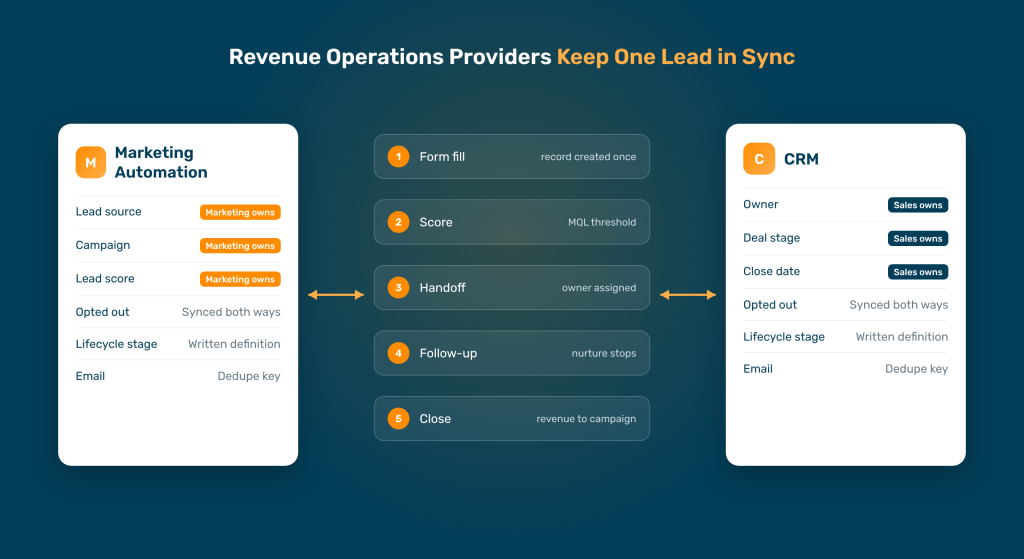
- The form fill. Which system creates the record first, and how does it check for an existing person with the same email?
- The score. Where does lead scoring live, and what exact threshold turns a lead into a marketing qualified lead (MQL)?
- The handoff. Which rule assigns an owner, and what happens if that rep is out? Routing logic often ends up split across forms, workflows, and the CRM. Ask where the provider would keep the routing rules and how changes get tracked.
- The sales follow-up. When a rep logs a call or changes the deal stage, does marketing see it, and do nurture emails stop?
- The close. When the deal closes, does the revenue tie back to the campaign that produced the lead?
After that, listen for specifics. A provider who names the fields, the sync rules, and the exception cases has done this before. Meanwhile, one who stays at the level of “we’ll sync everything” probably plans to turn on the native connector and stop there.
Red Flags in a Provider Proposal
Some warning signs show up on paper before any work starts, and they apply to revenue operations providers of every type.
First, watch for a proposal that skips testing. HubSpot itself recommends trying sync settings in a Salesforce sandbox or a HubSpot test account before touching production data. Any provider who plans to sync live records on day one is taking a risk with your database.
Second, be wary of a provider who wants to replace a tool your people already rely on. Sometimes a migration makes sense. Even so, it should come from a clear map of how your current systems hand data to each other. A System Automation Engagement (SAE) Map lays that out on one page before anyone recommends a change.
Third, look for documentation in the deliverables, since a sync nobody can explain is hard to fix later. If the sync rules live only in the provider’s head, they leave when the provider does.
Finally, check who owns the result after launch. Someone on your side should know which system wins for each important field and how to adjust it.
Opt-Outs and Consent Need Their Own Rules
Unsubscribes deserve separate attention, because a sync mistake here reaches the customer directly. If someone opts out in your marketing tool and a rep’s CRM still shows them as reachable, the next sequence can email a person who asked you to stop.
The major tools treat this field with extra care. Account Engagement, for instance, lets its own Opted Out value override Salesforce’s by default. Even so, the default only covers one direction of the problem. Opt-outs can also start in the CRM, in a support tool, or in a reply to a sales email.
Ask every provider how an opt-out travels from each system where it can start. A good answer names the field in each tool, the direction it flows, and what happens to a record that’s already enrolled in a sequence. In addition, ask how they’ll check the result after launch, since a single missed opt-out is easy to overlook in testing.
What a Finished Project Should Leave Behind
A sync project ends well when someone on your side can run it without the provider. That usually depends less on the build and more on what gets written down.
At a minimum, expect a field ownership sheet that lists each shared field, the system that owns it, and the sync rule. Next, expect written definitions for each lifecycle stage, so marketing and sales mean the same thing by a qualified lead. A short test log also helps, showing which records were checked before launch and what came back.
Finally, ask for a walkthrough with the person who will own the system day to day. Together, these pieces turn a one-time project into something your company can maintain. They also give every report a clear trail back to one source of truth, which is what the Monday meeting needed in the first place.
Revenue Operations Providers at a Glance
| Provider type | Best fit | Watch for |
|---|---|---|
| Vendor partner (HubSpot, Salesforce) | Most of your stack comes from one vendor | Less depth with tools outside that vendor |
| Independent RevOps consultancy | Marketing and CRM tools from different vendors | Scope that grows past what you need first |
| Automation builder | Rules are settled, and a handoff needs building | Nobody owning the rules behind the flows |
| Fractional RevOps lead | Smaller companies that need an owner | Limited hands-on capacity |
When the Default Sync Stops Fitting
At one business-to-business (B2B) company, marketing worked in HubSpot while sales lived in Zoho. The out-of-the-box sync between the two had drifted away from how the company sold, so each side counted leads its own way. Once both sides agreed on what counted as a lead, the systems stopped creating duplicates between them, and nobody had to switch tools.
That project started the way most good ones do. Before anyone changed a setting, someone mapped how records moved between marketing, sales, and the systems around them.
Frequently Asked Questions
Do I Need a RevOps Provider If My Marketing Automation and CRM Come From the Same Vendor?
Sometimes you can manage without one. A single-vendor stack removes most of the connector work, since the records already live in one database. You may still want help with lifecycle stages, scoring, and reporting, because those are design decisions the software doesn’t make for you.
Should Marketing or Sales Own the Lead Record?
Split ownership field by field. Marketing usually owns source, campaign, and score, while sales owns the owner field, deal stage, and close date. Writing that split down settles most arguments before they start.
What Should I Have Ready Before Talking to a Provider?
Bring a list of your systems, a rough count of contacts in each, and the reports people argue about most. It also helps to know roughly what the current mismatch costs you. A quick estimate of time lost to bad data gives the conversation a starting number.
Get Marketing and Sales Counting the Same Leads
When your marketing automation tool and your CRM finally agree, the Monday meeting gets shorter. Fruition RevOps can help you trace where your lead counts split apart. There’s no obligation attached.