
















Blueprint your revenue system like an architect blueprints a house.
See every platform, process, and handoff mapped visually.

The Systems Automation Engagements (SAE) Map reveals how your business actually operates. Most companies can’t answer: “Where does data break between Marketing and Sales?” or “Why do Operations build the wrong thing?” SAE shows you the answer — every system, every workflow, every gap highlighted in one visual map.

System Automation Engagements (SAE)

Visualize how your systems truly connect, revealing where data flows, stalls, or gets lost between teams.

Stop losing deals in the handoff between Sales, Ops, and CS. QDF moves data and triggers actions between systems instantly.

Your sales team closes a deal. Finance doesn’t see it for 3 days. Operations builds the wrong thing. Customer Success never gets the handoff. Quick Data Flow (QDF) fixes this — data flows between systems in real-time, without custom code that breaks when platforms update.

Workflow Automation

Turn every manual process into motion — connect systems, trigger actions, and let automation carry your revenue forward.

When every system tells a different story, nobody can make confident decisions. CDHS unifies CRM, ERP, Finance, and Ops into one real-time data layer and Single Source of Truth.

Your CRM says one thing. ERP says another. Finance is running reports from spreadsheets. Nobody trusts the data. The Centralized Data Hub System (CDHS) is your Single Source of Truth (SSOT) — real-time sync across every platform, governed data, and one unified view that actually works.

CDHS: How it Works?

Bring your data together in one place. It’s built to sync in real-time, link, and deliver insights you can use tomorrow.

Pre-built campaign automation kits, deploy customer engagement workflows without custom development.

Automation Campaigns Creator (ACC) provides pre-built engagement workflow kits designed to address specific areas of revenue leakage. Each ACC KIT includes campaign architecture, automation sequences, and multi-channel touchpoints — ready to deploy without custom development.

Automation Campaigns Creator (ACC)

Transform your Customer Engagement Journey with ACCs’ KITs intuitive automation tools.

Capture Decisions, Assign Tasks, and Keep Work Moving Without Manual Follow-Ups

Teams leave meetings with good intentions, but follow-through breaks down. Notes scatter across Slack. Action items disappear into documents. TALK-to-TASKS closes the execution gap — turn meeting recordings into correctly routed tasks automatically.

How TALK-to-TASKS Works?

Routing conversations from meetings with two clicks into the right place to the right person on your Project Tool.

Connecting systems is a solved problem. Governing the decisions inside them is not. The Decision Routing Cockpit is where the rules that run your revenue business finally live in one governed layer.

Right now those rules live in four places at once. A workflow no one owns, a spreadsheet no one updates, a script only one contractor reads, and the head of the person who remembers. The Decision Routing Cockpit (DRC) pulls all of them into one governed layer, with global defaults, per-case overrides, and every change audited six ways.

How Does It Work?

Every rule your revenue business runs on becomes named, scoped, and auditable. By the business, without a developer touching code.

Data Flow Architecture Design

Built from your SAE Map, we design workflows that connect systems and trigger the right actions at the right time.

Integration Path Selection

We choose the optimal path—native connectors, APIs, iPaaS (Make, Workato), or N8N—for reliable, scalable data flow.

Team Training & Documentation

We onboard your team, document workflows, and ensure everyone knows how the system works.

We design and build QDFs that move data and trigger actions across your systems in real-time.

You need workflows that don’t break when platforms update. We implement Quick Data Flows using your SAE Map as the blueprint—connecting CRM, ERP, operations, and finance so every action flows automatically without custom code that breaks on the next update.

CDHS Architecture Design

Built from your SAE Map, we design the central hub that connects all systems and establishes your single source of truth.

Master Data Management (MDM)

We establish control and accuracy across every record, ensuring clean, consistent, reliable data everywhere.

Data Governance & Flow Rules

We define ownership, validation rules, and automated flow logic to keep your data clean as it scales.

We implement CDHS so every system, report, and decision runs from one source of truth.

When CRM, ERP, Finance, and Operations all tell different stories, nobody can make confident decisions. We build your Centralized Data Hub System using your SAE Map to define data ownership, flow rules, and governance—so you finally have one real-time view that everyone trusts.

Campaign Strategy & Journey Mapping

We map your customer journey, identify engagement gaps, and design campaigns that address specific revenue leakage points.

Multi-Channel Workflow Design

We design coordinated workflows across email, SMS, in-app messaging, and sales triggers for unified engagement.

Campaign Launch & Optimization

We build, test, launch, and continuously optimize your campaigns for maximum conversion and engagement.

We design and deploy multi-channel engagement campaigns using ACC templates—customized for your customer journey.

Generic email sequences don’t work. We build Automation Campaign Creator (ACC) workflows tailored to your specific revenue leakage points—combining email, SMS, in-app, and sales triggers across HubSpot, Klaviyo, and your CRM to drive engagement that converts.

Integration Architecture & Path Design

Selecting the optimal path for seamless, scalable data flow across Departments.

Custom Implementation & Config

From simple plug-ins to advanced cross-system builds, we tailor each setup to your business logic.

Mastering Seamless Migration & Implementation Systems

Your new tools integrate smoothly, align with your workflows, and start delivering value from day one.

We don't just connect systems, we make them work in harmony. Fruition designs, builds, and implements integrations that keep your operations flowing without friction.

Most integrations are duct-taped APIs that break when platforms update. We design integration architecture for the long term—selecting the optimal path through native connectors, APIs, N8N, or iPaaS like Make or Workato.

15-minute conversation that reveals where your revenue system breaks — gaps, silos, missed handoffs mapped visually.

Most companies can’t answer basic questions: “Where does our sales data break?” “Why doesn’t Operations know what Marketing promised?” The SAE Diagnostic reveals your answer in 15 minutes — a visual map showing exactly where systems disconnect, data gets lost, and revenue leaks.

System Automation Engagements (SAE)

Visualize your business blueprint. See every system, process, and touchpoint in one place.

Stop Revenue Leakage

Find and fix the invisible cracks draining your time, money, and margins — before they turn into growth barriers.

Preventing your Data Silos — Get your SSOT

Centralize scattered data and replace confusion with clarity, ensuring every department works from one truth of data and build your single source of truth (SSOT).

Process Mapping & Documentation

We map how work truly gets done across RevOps, Production, and Operations — turning chaos into structured processes.

SOP Design for Automation Readiness

Every SOP is built with automation in mind, ensuring systems and people work together. Not against each other.

Adoption & Change Enablement

We don't just document; we drive adoption. Teams learn how to follow, improve, and trust the process, turning SOPs into muscle memory.

Transform tribal knowledge into repeatable workflows, giving your teams the structure to scale with clarity and consistency.

Automation breaks and centralization stalls when teams work from memory instead of process. We map how work truly gets done — turning SOPs into muscle memory, not shelfware.

Team Training & Enablement

Hands-on training sessions tailored to your team's roles, ensuring everyone uses new systems confidently from day one.

Adoption Measurement & Optimization

Track adoption metrics, identify blockers, and continuously optimize workflows to ensure your team actually uses what you built.

Gold Partner Implementation Support

We're Gold Partners with HubSpot, Monday.com, and Segment — meaning we bring certified expertise to every implementation.

We don't just hand over systems — we onboard your team, train them to use tools confidently, and ensure adoption sticks.

New systems fail when teams don’t adopt them. We train, enable, and support your team through the transition. As Gold Partners with HubSpot, Monday.com, and Segment, we know how to make systems work for your people.

RevOps Strategy & System Architecture

We align your go-to-market strategy with your tech stack, designing the operational backbone that connects Marketing, Sales, and CS.

Performance & Optimization with Automation Support by AI agent

Our consultants analyze your funnel, uncover hidden inefficiencies, and rebuild your operations for precision, speed, and scalability.

Tech Stack Alignment & Implementation

From HubSpot and NetSuite to Monday.com and Shipwell, we integrate and orchestrate your tech ecosystem into one coordinated revenue engine.

Strategic advisory for revenue operations — system architecture, automation strategy, data governance, and team enablement.

RevOps isn’t just about connecting systems — it’s about aligning strategy, data, and execution. Our consultants bring two decades of experience building revenue engines for $50M-$500M companies.

The LET DATA FLOW™ Framework

Fruition RevOps’ proven framework turns disconnected systems into synchronized revenue engines. Each stage reveals where your data, workflows, and teams fall out of sync, and rebuilds them into one intelligent flow that drives efficiency, visibility, and growth.
Four stages that guarantee smooth process alignment

1

Diagram Your SAE Map

Map how your business actually operates across teams, capturing the customer journey, decision points, system roles, data handoffs, and revenue flow. This blueprint surfaces inefficiencies and defines what must be automated versus redesigned.

2

Map Your Data & Automation Attributes

Translate the SAE blueprint into a concrete data flow and automation model — defining system ownership, data attributes, relationships, and trigger logic. This prepares your foundation before building QDFs.

3

Centralize the Flow (CDHS)

Implement the Centralized Data Hub System as the governance layer connecting all systems and QDFs. CDHS enforces data ownership, flow rules, and establishes a single source of truth — ensuring automation stays stable as you scale.

4

Build & Execute Data Flow (QDF)

Deploy targeted Quick Data Flows that move data and trigger actions across systems in real time. Each QDF handles a specific business event — deal progression, order creation, production updates, billing changes — without manual intervention.

Manufacturing

Sync production schedules, inventory, and order fulfillment across ERP, CRM, and operations.

Healthcare

Connect patient data, billing, and care coordination across EMR, RCM, and operations systems.

Technology

Align product, engineering, sales, and customer success with real-time data across tools.

Consumer Services

Unify ticketing, CRM, and knowledge bases to deliver seamless customer experiences at scale.

Retail

Connect POS, inventory, e-commerce, and fulfillment for real-time visibility across channels.

Franchisors

Centralize franchise operations, royalty tracking, and performance reporting across locations.

Agencies

Sync project management, client billing, and team capacity across tools for better margins.

Investments

Unify portfolio tracking, deal flow, and LP reporting for complete investment oversight.

Meet Our Team

The automation architects, data specialists, and RevOps consultants behind Fruition.

Our History

Two decades transforming disconnected systems into unified revenue engines.

Partner With Fruition

Join our network of agencies and consultants implementing Fruition frameworks.

Our Philosophy

Where technology meets process—aligning Platforms, People, Processes, and Insights.

Resources & Learning

Latest Blog Posts

Stay current with RevOps insights and automation strategies

VideoTube Channel

Watch automation tutorials and implementation guides

Free RevOps Evaluation

Assess your revenue operations maturity

ACC Templates

Pre-built automation campaign kits ready to deploy

Framework Guide

Learn the Let Data Flow methodology step-by-step

Contact Our Team

Talk to automation architects about your systems

Case Studies

Real implementations with measurable results

Tools & Calculators

Revenue Leakage Calculator and diagnostic tools

Start Here Page

Not sure where to begin? We’ll guide you.

Why Data Flow

Most RevOps fixes treat the symptom. This is how we fix the operating model underneath.

Data Leakage Calculator

Find out how much revenue your business is losing and exactly where it’s slipping through the cracks.

Pricing

Every engagement follows a logical journey. Here’s where it starts.

SAE Architecture Map

Find where your revenue is breaking — every engagement starts here. We map your systems, identify leakage points, and show you exactly what to fix first.

Which Sales Operations Software Helps a Remote Sales Team Scale?

Sales operations software decides how well a remote sales team holds together once it grows past the point where everyone knows everyone. With five reps, a manager can still keep the pipeline in their head. At twenty reps spread across three time zones, leads wait for an owner and forecasts turn into guesses. Nobody can sit in on a call to see what went wrong.
Growing sales orgs usually solve this with a handful of tools. Each one covers a job that used to happen in person. Think of handing off a lead, listening in on a call, or showing a new hire the ropes. The trouble is that every new tool stores a separate version of each customer, so revenue tends to leak between them.
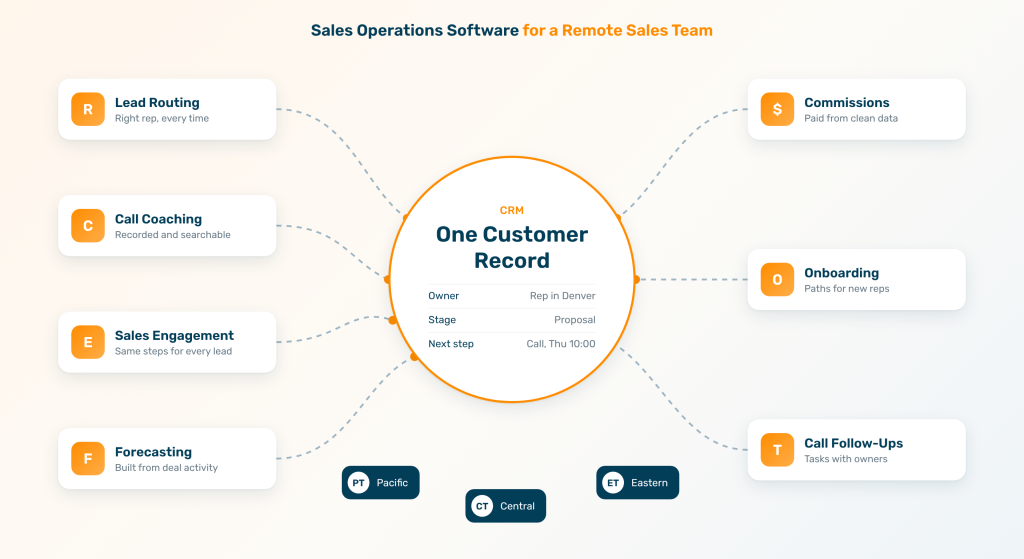
Sales operations software for a remote sales team, with CRM, lead routing, call coaching, forecasting, commissions, and onboarding sharing one customer record

What Changes When a Remote Sales Org Grows

Remote selling has become a normal part of how business-to-business (B2B) buyers buy. McKinsey’s B2B Pulse research found that buyers use up to ten channels in a single purchase. It also found that two-thirds of buyers and sellers prefer remote engagement at many stages. That research dates from 2022, so treat the exact figures as a snapshot.
For the people running sales operations, that shift changes the job. In an office, a rep could lean over and ask who owns an account. Remotely, every answer has to live in a system, and every system has to agree with the others.
As a result, the work of a sales ops lead falls into a few clear jobs. They keep one record of every customer, route each lead to the right rep, and coach calls they never hear live. They also keep outreach consistent, build a forecast people trust, pay reps correctly, and ramp new hires from a distance. Each section below covers one of those jobs and the sales operations software built for it.

CRM Sales Operations Software: One Record for Every Rep

Everything else in the stack reads from the customer relationship management (CRM) system, so it comes first. For a remote org, the CRM also replaces the hallway conversation. If a detail isn’t in the record, the rep on the next call doesn’t know it.

HubSpot Sales Hub

HubSpot Sales Hub suits growing companies that want sales, marketing, and service on one database. Its sales features include deal pipelines, deal scoring, playbooks, forecasting, and conversation intelligence. In addition, HubSpot Notetaker records meetings, and the Breeze Prospecting Agent, still in beta, helps with research and outreach. Because marketing and service work in the same system, a remote rep can see every email, ticket, and form fill before a call.

Salesforce Sales Cloud

Salesforce Sales Cloud fits larger or more complex sales orgs that need deep customization. It covers lead, account, and opportunity management, along with forecast management and pipeline management. Its workflow automation also handles territory assignment, which matters once reps cover regions instead of a shared list. However, that flexibility usually needs an administrator to keep it tidy as the org grows.
Whichever CRM you pick, it should stay the home base that every other sales tool reads from. That split between the CRM and the tools around it is worth understanding before you buy, and it sits at the heart of the CRM versus sales ops debate.

Lead Routing Software for Reps Who Work Remotely

Lead routing breaks early in a remote org. In an office, a manager might shout across the room to hand off a hot lead. Remotely, a lead that lands with the wrong rep, or with a rep on vacation, can sit for days before anyone notices.

HubSpot Lead Rotation

For HubSpot users, the rotate record to owner action in workflows assigns new records evenly across selected reps or a team. It needs Sales Hub Professional or Enterprise. For leads, HubSpot also offers a setting that skips reps marked as away, so a lead doesn’t land with someone who’s out.

Chili Piper Distro

Chili Piper Distro handles more complex routing for Salesforce users. It matches each lead to an existing account owner first, then sends unowned leads through weighted round robin. It can also route by territory, company size, or industry. Since Distro reads rep calendars, it pulls people out of the queue while they’re out of office. Follow-up rules then remind reps about untouched leads and reassign them if nobody acts.
The catch comes as rules spread across several tools. A form tool, the CRM, and a scheduling app may each hold part of the routing logic. Then nobody can say which rule sent a lead where. Keeping those rules in one place, with a log of changes, makes it easy to trace a misrouted lead back to its cause.

Coaching Software for Calls Managers Can't Sit In On

Remote managers lose the easiest coaching tool they had, which was overhearing calls. Conversation intelligence software brings that back by recording and analyzing what happens on calls.

Gong

Gong joins scheduled calls, records inbound and outbound phone calls, and transcribes them so anyone can search them. It also flags deals that look at risk and builds a library of strong calls for new reps to study. For a manager with reps in four cities, that library replaces sitting next to a top performer.

HubSpot Conversation Intelligence

For orgs already on HubSpot, its conversation intelligence and call tracking features record and transcribe calls inside the CRM. Managers can review calls on the contact record without switching tools. As a result, it works well for smaller orgs that don’t need a separate coaching product yet.
Recording calls only helps if the follow-ups happen, though. Plenty of call notes end up in one more inbox while the next steps go nowhere. It pays to turn each recording into assigned tasks with an owner and a due date. That way, the promises made on a call reach the people who have to keep them.

Sales Engagement Software Across Time Zones

Once a remote org grows, each rep tends to build their own outreach routine. Some call first, some email first, and some forget the third touch altogether. Sales engagement software sets a shared sequence of steps so every lead gets the same treatment, whoever owns it.

Clari + Salesloft

Salesloft built its name on cadences, which are scheduled sequences of emails, calls, and tasks. In December 2025, Clari and Salesloft completed their merger and now sell as one company. Clari brings forecasting and pipeline insight, while Salesloft brings the day-to-day outreach. For buyers, that means one vendor for both jobs.

Outreach

Outreach covers similar ground with sequences that mix email, calls, and tasks, and it also offers forecasting. If you’re comparing Outreach and Salesloft, let a few reps try both, since they’re the ones who will use it every day. Either way, the value for a remote org comes from managers seeing every rep’s activity in one place.

Sales Forecasting Software That Uses Deal Activity

Remote forecasting often starts as a spreadsheet that each rep updates on Friday. By the time the numbers roll up, they reflect how reps feel about their deals more than what buyers have done. Forecasting software reads activity such as emails, calls, and meetings to show which deals are moving.
Gong Forecast and Clari both work this way. They analyze conversations and engagement across the pipeline. HubSpot’s forecasting tool takes a simpler route and builds on the deal data already in the CRM.
Still, a forecast inherits every gap in the records beneath it. When marketing and sales keep separate records, the same lead can show up twice or not at all. One company in this spot ran marketing in one CRM and sales in another. Their reports never matched until both sides counted leads the same way.

Commission Software for Remote Reps

Pay disputes travel badly over chat. When a rep can’t see how a commission was calculated, a small question turns into a long thread. The sales ops lead loses an afternoon to it. Commission software calculates payouts from CRM data and shows reps their numbers as deals close.

CaptivateIQ

CaptivateIQ pulls deal data from Salesforce or HubSpot and applies each plan’s rules, including tiers, accelerators, bonuses, and draws. Reps see payout statements as deals close. It also works with NetSuite and Workday, and its modeling tools let sales ops test a new plan before rolling it out.

Salesforce Spiff

Salesforce bought Spiff and now sells it as Salesforce Spiff, included in the Sales Cloud Max edition. For orgs already deep in Salesforce, it keeps commission rules next to the opportunity data they depend on.
Commission software inherits every error in the CRM, though. A deal with the wrong close date or a duplicate account can pay the wrong rep. Before you automate payouts, it helps to know what bad data costs you today.

Sales Enablement Software for Ramping New Reps

New remote hires can’t learn by watching the person at the next desk. Enablement software gives them a structured path instead, with training, practice, and the content they need for each stage of a deal.

Highspot

Highspot builds role-specific learning paths for new sellers. Its AI Role Play feature lets reps rehearse key moments before they face a buyer. Managers then use scorecards to focus coaching on the skills that matter most. For a distributed org, that gives every new rep the same starting point, wherever they sit.
Gong’s coaching library, mentioned above, also works well alongside an enablement tool. New reps can study real calls from top performers while they work through their training.

Sales Operations Software at a Glance

JobTools to considerBest fit
One customer recordHubSpot Sales Hub, Salesforce Sales CloudEvery remote sales org
Lead routingHubSpot lead rotation, Chili Piper DistroOrgs with territories or many inbound leads
Call coachingGong, HubSpot conversation intelligenceManagers who can't sit in on calls
Sales engagementClari + Salesloft, OutreachReps working leads across time zones
ForecastingGong Forecast, Clari, HubSpot forecastingLeaders reporting to a board
CommissionsCaptivateIQ, Salesforce SpiffOrgs with tiered or changing plans
OnboardingHighspotOrgs hiring reps every quarter

Where Remote Sales Stacks Break Down

Each tool above solves its own job well. The trouble shows up between them. A remote sales org might run a CRM, a routing tool, a call recorder, a sales engagement platform, and a commission tool. Each one holds a slightly different picture of the same buyer.
When those copies drift apart, the symptoms look familiar. The forecast says one thing and the commission report says another. A lead gets routed to a rep who left last month. Meanwhile, a buyer repeats their story on every call because the notes never reached the CRM.
The fix starts with naming a home system for every field, such as the deal amount, the owner, and the close date. Every other tool then reads that field from its home and stops storing a duplicate. Some companies handle this with a central data hub that sits between the tools they already run. Either way, reps keep the software they like, and sales ops gets one version of every number.

Frequently Asked Questions

How Is Sales Operations Different From RevOps?

Sales operations focuses on the sales org itself, including territories, quotas, pipeline, and the tools reps use every day. RevOps covers the full path from first touch to renewal, so it spans marketing, sales, and customer success. In a smaller company, one person often does both jobs, and the line between them blurs.
The categories stay the same, but the order changes. An office can get by for longer on informal handoffs and managers who overhear calls. A remote sales org leans on lead routing, call recording, and written follow-ups much sooner. Nothing gets passed along by sitting in the same room.
Give one person the final say over the sales stack, even if it isn’t their full-time job. That person decides which system holds each number, approves new tools, and keeps definitions such as a qualified lead consistent. Without an owner, each manager tends to buy their own tool, and the copies of the customer multiply.
Most remote sales orgs need fewer tools than they end up with. Many of the tools above overlap, so a HubSpot user might cover routing, call recording, and forecasting inside Sales Hub before adding anything else. Before you add another tool, map how your current systems hand data to each other. A System Automation Engagement (SAE) Map charts every system and handoff on one page.

Line Up Your Sales Operations Software

Your reps can sit in different time zones and still work from the same customer record. If your sales tools keep telling different stories, Fruition RevOps can help you find where the records split. There’s no obligation attached.

Schedule a Time with our Expert!

— Fill out the Form and let's meet —

Fill out the form below to book your meeting to get your HubSpot Audit Report.

Schedule a meeting
Your HubSpot Onboarding Plan.

** Schedule to have you High level plan for free.

Funnel Types List

Register and Get the Funnel List type

Provide you with a complete overview of the type of funnel and how to manage it. 

JOIN OUR LIVE EVENT!

Wednesday, October 18th
10AM (PST)

Webinar Topic: Fix the Leak with Streamline Your Revenue Path with RevOps Funnels. 
How to seamlessly guide prospects through your company’s journey,

  1. Utilize the Funnels in Revenue Operations
  2. How to Prevent Bleeding Prospects and Customers in Your Company’s Journey
  3. How to Automate the Process for Enhanced Efficiency

RevOps Knowledge Sharing!

Fill out the form below, and blogs, videos and content will come directly to your inbox.